Arcade Stick vs Controller vs Leverless: Which Should You Use?
Pad, arcade stick or leverless? How each handles motion inputs, charge characters and 3D fighters, what SOCD cleaning is, and what tournaments allow.

Few topics start arguments in fighting game communities as reliably as controllers. Arcade stick players talk about authenticity, leverless players talk about precision, and pad players point out that they keep winning anyway. The useful truth is less dramatic: all three device types are competitive, each makes some things easier and other things harder, and the right one depends on the games you play and how your hands feel after an hour.
This guide explains how each device works, how it handles the inputs fighting games ask for, what SOCD means and why tournaments regulate it, and how to decide without spending money you do not need to.
The Three Device Types
Controller (Pad)
The standard gamepad that came with your console: a directional pad, an analog stick, four face buttons and shoulder buttons and triggers. Most fighting game players start here, and many never leave. Fighting games are usually played with the d-pad rather than the analog stick, because the d-pad gives clear, clicky directions, though some players prefer the stick, especially in 3D games or Smash.
There are also dedicated “fightpads,” controllers shaped like a pad but with six face buttons in two rows, matching the layout of six-button 2D fighters.
Arcade Stick
An arcade stick recreates an arcade cabinet’s controls: a lever for directions on the left and a panel of buttons on the right, typically eight. The lever moves within a gate, often square or octagonal, and microswitches register the direction. Sticks are large, heavy enough to sit on a lap or table, and usually let you swap parts such as the lever’s ball top or the buttons.
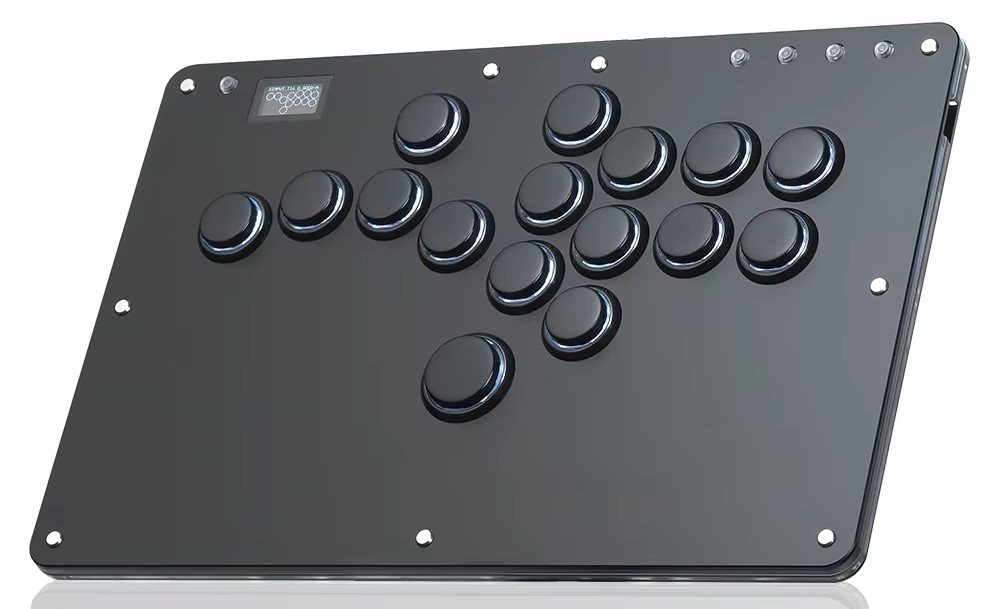
Leverless (All-Button) Controller
A leverless controller replaces the lever with buttons. In the most common layout, left, down and right sit under the fingers of your left hand, like keys on a keyboard, and up sits under your thumb, often below the attack buttons. The Hit Box was the best-known early example of this design, which is why the category is still often called “hitbox” informally. Keyboards follow the same principle, since every direction is a separate key.
How Each Device Handles Fighting Game Inputs
Different inputs stress different devices. Our guide to fighting game notation explains the numbers used below.
| Input | Pad (d-pad) | Arcade stick | Leverless |
|---|---|---|---|
| Quarter circle (236) | Easy with a thumb roll | Natural, smooth motion | Three fingers pressed in sequence; quick once learned |
| Dragon punch (623) | Easy to learn, sometimes produces accidental jumps | Comfortable, but takes practice to be fast | Very precise, a known strength |
| 360 / half-circle | Possible, can be awkward | Often considered the most natural | Requires learning finger patterns, including the thumb for up |
| Charge (hold back, then forward) | Fine, thumb holds the direction | Fine, the classic way | Charging is easy; switching directions is instant |
| Fast dashes and backdashes | Fast thumb taps | Requires wrist or finger movement | Very fast, button taps |
| Holding a diagonal precisely | Can slip off the diagonal | Gate helps find corners | Exact, two buttons held |
Motion Inputs
Quarter circles and dragon punches are the bread and butter of 2D fighters. On a stick they are smooth arcs; on a pad they are thumb rolls; on leverless they become finger sequences, similar to typing. None is objectively faster for everyone. Leverless tends to be very accurate for inputs like the dragon punch, because there is no travel distance and no risk of overshooting into up. Stick users tend to find large motions like 360s natural. Pad players can perform everything, though some find circular inputs uncomfortable on the d-pad over long sessions.
Charge Characters
Charge characters need you to hold a direction, usually back or down-back, for a moment before pressing the opposite direction plus a button. On a stick or pad this means holding the lever or d-pad in place. On leverless, holding a direction is just holding a button, and the release to the opposite direction is instantaneous, which can make some charge techniques easier. This is one reason SOCD handling became such a big topic, as explained below.
3D Fighters
Tekken and other 3D fighters rely heavily on movement: backdashing repeatedly, sidestepping into the foreground or background, and inputs like crouch dash. Pads and leverless controllers both handle fast repeated taps well. Arcade sticks are fully viable in Tekken, and stick players are common there, but some movement techniques take more practice on a lever. Some Tekken players also prefer pads because the face buttons map neatly to the game’s four-limb layout.
SOCD Explained
SOCD stands for Simultaneous Opposite Cardinal Directions: pressing left and right at the same time, or up and down at the same time. On a joystick or d-pad this is physically impossible, because the lever or pad cannot point both ways at once. On a leverless controller or keyboard it is trivial, since each direction is a separate button.
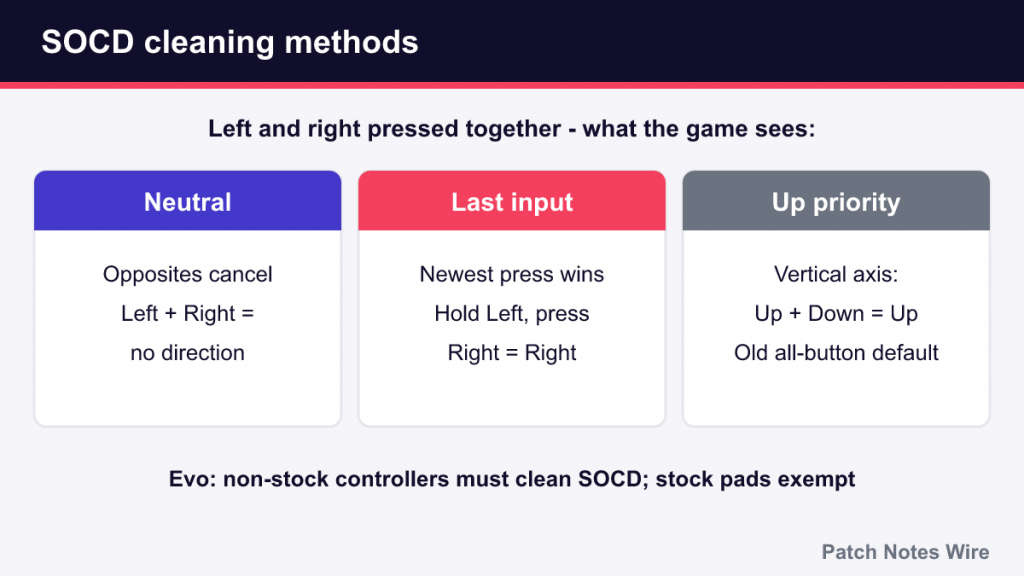
Games were not designed to receive both opposite directions at once, so controllers resolve them with SOCD cleaning, a rule that decides what the game actually sees. The common methods are:
- Neutral – opposite directions cancel out. Left plus right outputs no horizontal direction.
- Last input priority – the most recent direction wins. If you hold left and then press right, the game sees right; releasing right returns to left.
- Up priority – used for the vertical axis on some layouts: up plus down outputs up. It was a long-standing default on early all-button controllers.
Why does this matter? Cleaning methods can create advantages. With last input priority, a charge character can hold back to charge and press forward without releasing back, then let go of forward to instantly return to blocking. Up priority can let a player hold down for a crouch and tap up for a jump without moving their other fingers. These behaviors are not possible on a stick or pad, so tournament organizers have set rules to keep devices on a level playing field.
What Tournaments Allow
Controller rules are set per event and sometimes per game, so always read the specific ruleset before a tournament. As of 2026, the general picture from major rulesets looks like this:
- Evo – non-stock controllers may not send simultaneous opposite cardinal directions to the game, meaning they must use SOCD cleaning. Stock gamepads such as the DualShock 4 and DualSense are explicitly exempt. Cleaning methods such as Neutral and Last Input Priority are allowed unless a game’s pro tour ruleset says otherwise. Hardware macros, programmable input sequences and rapid-fire functions are prohibited, while macros available in a game’s own controller settings are allowed.
- Capcom Pro Tour – Capcom’s rules have been stricter for Street Fighter. In a March 2023 update, Capcom required that up and down pressed together resolve to neutral rather than up, replacing the older up-priority convention, and left and right pressed together must not produce forward or backward movement, which in practice means Left + Right = Neutral. That rules out last input priority for Capcom-sanctioned play. The disagreement is not new: back in 2019, Capcom banned a last-input-priority all-button controller at a Pro Tour event, and Evo then declared such controllers legal at its own tournaments.
- Other circuits and locals – many events follow the publisher’s pro tour rules for each game. Left + Right = Neutral is the most common requirement, while Smash events tend to have their own controller conventions.
- Wireless controllers – Evo’s rules generally do not permit wireless controllers unless a game’s rules say otherwise, with exceptions for first-party PlayStation pads on their own consoles. Bring a cable.
Most modern leverless controllers let you switch SOCD modes, often through a button combination when plugging in. If you plan to compete, set yours to the mode required for the game you are entering, and check the event’s posted rules rather than assuming they match last year’s.
Why Pad Is Fully Viable
A common beginner worry is that pad is a handicap. It is not. Pads are used at the highest levels of Street Fighter, Tekken, Guilty Gear and especially Smash, where GameCube-style controllers have long been the standard for competitive play. Several reasons make pad a strong choice:
- You already own one and are used to it.
- Taps are fast, which helps with dashes, backdashes and Tekken movement.
- Stock pads are exempt from SOCD rules, so there is nothing to configure for tournaments.
- Modern control schemes, such as Street Fighter 6’s Modern controls or Tekken 8’s Special Style, work on any device, and some players find them especially comfortable on pad. Our Street Fighter 6 beginner guide covers SF6’s control types.
The main downsides are ergonomic. Some players find long sessions of circular d-pad motions uncomfortable for the thumb, and default button layouts put some attacks on shoulder buttons or triggers. Remapping buttons in the game’s settings solves most layout complaints.
Pros and Cons Summary
Arcade Stick
- Pros: natural motions, especially large ones; buttons laid out in the classic six-button pattern; durable and customizable.
- Cons: bulky to carry; a learning period even for experienced pad players; some fast movement takes extra practice.
Leverless
- Pros: precise directional inputs; very fast dashes and direction changes; comfortable for players used to keyboards.
- Cons: a significant relearning period; SOCD settings to manage for tournaments; motions feel very different from a lever.
Pad
- Pros: no extra cost; familiar; fast taps; no SOCD configuration for stock pads.
- Cons: thumb fatigue for some players; default layouts may need remapping; the d-pad quality varies a lot between models.
How to Decide
Start with the pad you already own. Play for a few weeks and notice what actually bothers you. If you keep getting jumps instead of dragon punches, try practicing the input slowly in training mode before blaming the device. If your thumb hurts after long sessions, that is a real reason to consider a stick or leverless, and a reason to take breaks. If you keep missing fast dashes on a stick, a pad or leverless may suit you better.
If possible, try other devices before buying, at a local meetup, a friend’s setup or a store. Expect any switch to make you worse for a while; every device has a learning period, and comparing a new device against years of pad muscle memory is not a fair test. Give it a few weeks of regular practice before judging.
Finally, remember that the device matters far less than the decisions you make with it. Blocking, spacing and punishing are what win matches, and they work the same on every controller. If you have not yet picked a game to practice with, our guide on how to choose your first fighting game is a better first step than shopping for hardware.