Street Fighter 6 Beginner Guide: Controls, Modes and First Steps
New to Street Fighter 6? Learn Classic vs Modern vs Dynamic controls, the Drive Gauge, the main modes and a simple first-week plan for getting better.

Street Fighter 6 is the most beginner-friendly entry the series has produced, but it can still feel overwhelming the first time you open it. There are three control schemes, a single-player open world, an online lobby full of avatars, and a fighting system built around a gauge that powers half the moves in the game. This guide explains what each of those pieces is, which ones to focus on first, and how to spend your first week so that you actually improve instead of just losing online.
Street Fighter 6 launched on June 2, 2023 for PlayStation 4, PlayStation 5, Xbox Series X|S and PC, and arrived on Nintendo Switch 2 as a launch title on June 5, 2025. The base game launched with 18 characters, and Capcom has added more through yearly character passes, with new fighters still being released as of 2026. Everything below applies to all platforms.
Choosing a Control Type: Classic, Modern or Dynamic
The first decision the game asks you to make is which control type to use. You can change it at any time and set it separately per character, so it is not a permanent commitment.
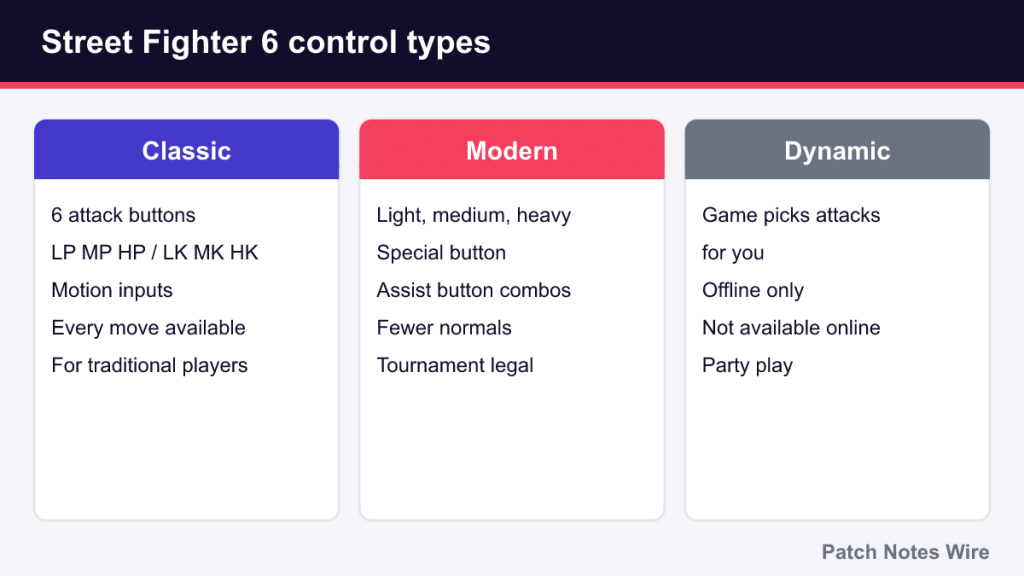
| Control type | How it works | Best for |
|---|---|---|
| Classic | Six attack buttons (light, medium and heavy punch and kick) and traditional motion inputs for specials | Players who want the full traditional experience or have played older Street Fighter games |
| Modern | Light, medium and heavy attack buttons, a Special button and an Assist button | Beginners, players on pad who struggle with motions, anyone who wants to focus on decisions over execution |
| Dynamic | The game chooses an appropriate attack for you based on the situation | Casual play with friends; it is offline-only and not available online |
Classic
Classic uses the button layout the series has had since Street Fighter II: light, medium and heavy punch (LP, MP, HP) and the same three kicks (LK, MK, HK). Special moves use motion inputs such as quarter-circle forward for a fireball. It offers every move and the most flexibility.
Modern
Modern simplifies the game without removing its depth. Special moves come out with the Special button plus a direction, so Ryu’s Hadoken is a single press of Special and his Shoryuken is forward plus Special. Holding the Assist button while pressing an attack button performs pre-built “assist combos,” which lets a brand-new player land a full combo from day one.
The trade-off is that Modern gives each character a reduced set of normal moves, and specials done with the one-button shortcut deal less damage. Widely cited community testing puts that reduction at about 20 percent compared with the same move done with a motion input. You can still use motion inputs on Modern to get full damage. Modern is tournament legal and is used successfully at high levels, so choosing it is not a “kids mode” decision.
Dynamic
Dynamic is designed for someone picking up a controller for the first time, often at a party. It cannot be used online and does not teach much about how the game really works. Treat it as a fun extra rather than a learning tool.
Our suggestion: if you have never played a fighting game, start on Modern. If you already know how to do motion inputs, or you specifically want to learn them, start on Classic. Both are complete ways to play.
The Drive Gauge at a Glance
The Drive Gauge is the heart of Street Fighter 6. It sits under your health bar, has six bars, starts each round full and refills over time. It powers five core techniques:
- Drive Impact — an armored attack that absorbs hits and can crumple or wall-splat the opponent.
- Drive Parry — a hold-to-parry defensive stance; well-timed parries become Perfect Parries.
- Drive Rush — a fast forward dash that makes your next attack more advantageous.
- Drive Reversal — a counterattack done while blocking to push the opponent away.
- Overdrive Arts — stronger versions of special moves.
If you use up the whole gauge, you enter Burnout. While burnt out you cannot use Drive techniques until the gauge refills, you take chip damage when blocking special moves, and a Drive Impact that is blocked near the corner will stun you. Avoiding Burnout is one of the first strategic habits worth building.
As a beginner you do not need to master every technique. Two things are enough at first: learn to react to an opponent’s Drive Impact with your own Drive Impact (one armored move beats the other when timed correctly), and do not spend your gauge so freely that you burn out. A full breakdown of every technique, costs and counters will help once you are comfortable with the basics.
The Three Main Modes
Street Fighter 6 is split into three hubs on the main menu.
Fighting Ground
Fighting Ground contains the traditional fighting game content: Arcade mode, Versus (local matches against a friend or CPU), Extreme Battle (matches with special rules and gimmicks), and, most importantly, Training mode with tutorials, character guides and combo trials. It is where you will spend most of your learning time.
World Tour
World Tour is a single-player story mode in which you create a custom avatar and explore 3D city environments. You meet the cast as “masters,” learn their moves and mix them together on your avatar. It is an enjoyable way to get used to the game’s systems, and its fights introduce mechanics gradually, but avatar battles are very different from regular matches. Use it as a fun side activity, not your main training.
Battle Hub
Battle Hub is an online lobby where your World Tour avatar walks around, sits down at cabinets to play other people, and joins events. Ranked and Casual matchmaking are available here and also from the online menu. Battle Hub also includes playable classic Capcom arcade games.
Training Mode: Where Improvement Happens
Training mode looks like an empty room with a dummy, but it is the most valuable part of the game. A few features are especially useful for new players:

- Tutorials explain the basic mechanics in short, interactive lessons.
- Character Guides teach each character’s key moves and how they are meant to be used.
- Combo Trials give you specific combos to perform, starting simple and getting harder.
- Input display and frame meter show exactly what you pressed and how long moves take. If those numbers look confusing, our guide to frame data explains startup, recovery and advantage.
- Dummy settings and recordings let you make the dummy block, jump or repeat a specific attack so you can practice your response.
Community combo guides use a shorthand like 2MK xx 236HP. Our guide to fighting game notation teaches you to read it, so you can learn from wikis and videos as well as the in-game trials.
Picking a First Character by Archetype
Rather than following a tier list, pick a character whose play style appeals to you and whose basic tools are easy to understand. Character balance changes with patches; what makes a character beginner-friendly does not.
| Archetype | What you do | Examples |
|---|---|---|
| All-rounder (shoto) | Fireball, invincible uppercut, solid normals; teaches fundamentals | Ryu, Ken, Luke |
| Zoner | Keep the opponent at range with projectiles | Guile, Dhalsim, JP |
| Grappler | Get close and land big command throws | Zangief, Manon, Lily |
| Rushdown | Constant close-range pressure | Cammy, Jamie, Juri |
| Charge character | Hold directions to charge specials, strong defense | Guile, E. Honda, Blanka |
For most newcomers, an all-rounder such as Ryu, Ken or Luke is a sensible starting point because their toolkit teaches the concepts that apply to everyone else. But if a character’s look or style excites you, that motivation matters more than any recommendation. Characters such as Dhalsim and JP are usually considered harder to start with because their plans depend on precise spacing.
A Simple First-Week Learning Path
You do not need hours a day. The plan below assumes short sessions and focuses on one skill at a time.
- Day 1: Tutorials. Complete the basic tutorials in Fighting Ground and choose your control type and character.
- Day 2: Movement and blocking. In training mode, practice walking, jumping, dashing, and blocking high and low. Set the dummy to attack and practice blocking it.
- Day 3: Your key moves. Play through your character’s guide. Pick one reliable poke, one anti-air and one special you will rely on.
- Day 4: One combo. Learn a single short combo from Combo Trials or a guide, starting from a light attack. Practice it on both sides of the screen.
- Day 5: Anti-airs. Set the dummy to jump at you and practice hitting it with your anti-air until it becomes a reflex.
- Day 6: Play the CPU. Use Arcade or Versus against the CPU at a moderate difficulty to apply the moves you learned.
- Day 7: Go online. Play Casual or Ranked. Casual matches carry no rank pressure if you want a gentler start.
After a match you lose, pick one thing that beat you repeatedly and take it to training mode. That habit, more than any combo, is what separates players who improve from players who plateau.
Common Beginner Mistakes
- Jumping constantly. Jumps are easy to anti-air. Stay on the ground more and jump with purpose.
- Never blocking. Holding back is a real option. Many beginners lose because they press buttons whenever they are attacked.
- Ignoring throws. If an opponent keeps blocking, throw them (LP plus LK on Classic). If you keep getting thrown, learn to tech.
- Burning out the Drive Gauge. Every Drive Rush and Drive Impact costs bars. Leave yourself a reserve.
- Learning too many combos. One reliable combo you can land in a real match is worth more than ten you can only do in training.
- Judging yourself by early rank. Losses are expected while matchmaking figures out your level. Focus on whether you are making better decisions.
If the terms in this guide, like anti-air, punish or frame trap, are new to you, keep our fighting game glossary open while you play.